

·4 min read
AI Video Generation API Tutorial: Submit, Poll, and Download
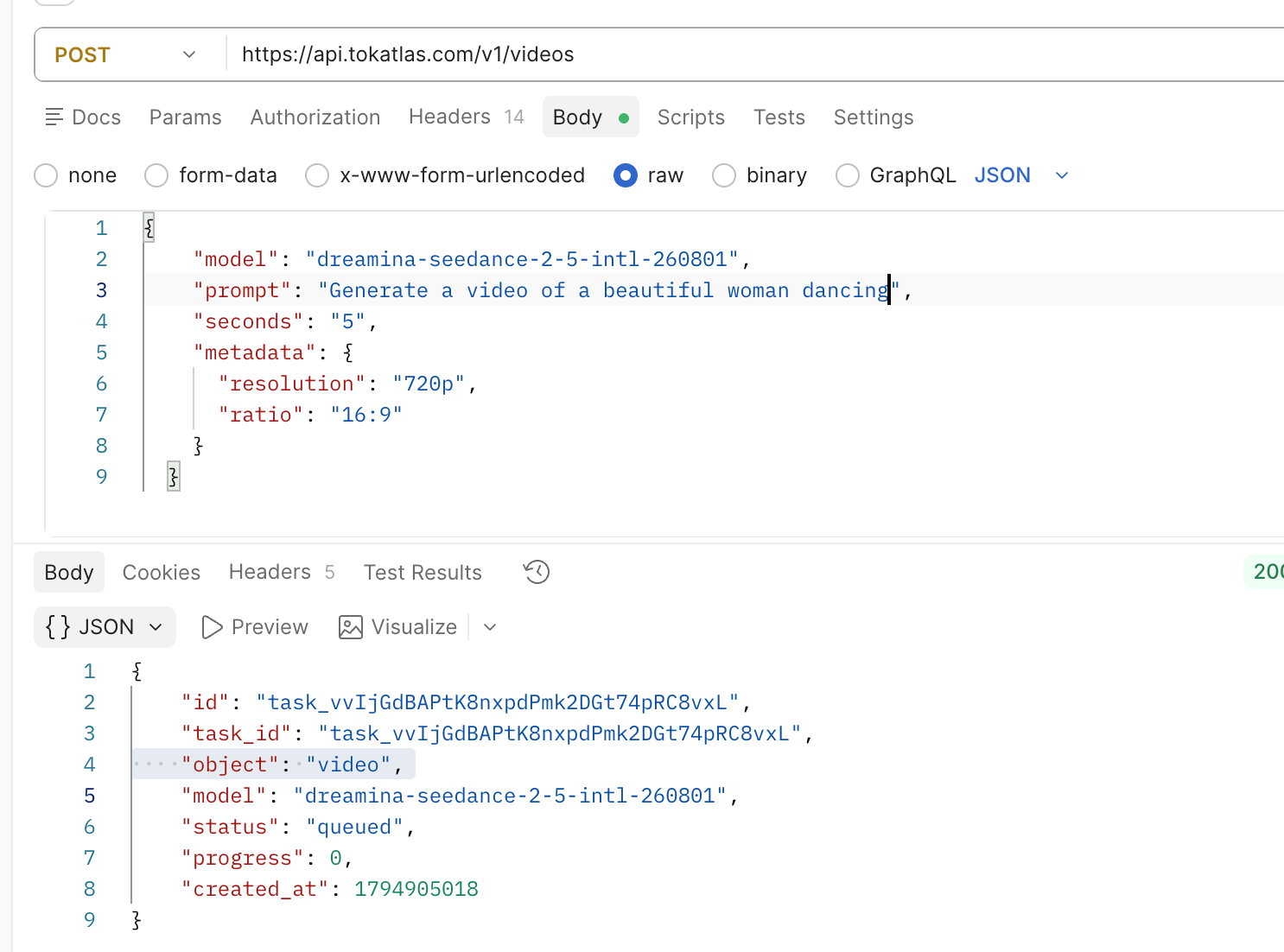
Direct answer: an AI video generation API is usually an asynchronous workflow, not one request that returns an MP4. Submit a video task, save its task ID, query that ID until it is completed or failed, and download the file only after completion. TokAtlas provides those steps through POST /v1/videos, GET /v1/videos/{id}, and GET /v1/videos/{id}/content.
How an AI video generation API workflow works
- Submit: call POST /v1/videos with an enabled model ID, prompt, and supported settings. Persist the returned id immediately.
- Poll: call GET /v1/videos/{id}. Treat queued and in_progress as pending states, not as a finished video.
- Download: call GET /v1/videos/{id}/content only when status=completed. Preserve the returned error when the task is failed.
This lifecycle applies to a text-to-video API, an image-to-video API, asynchronous video jobs, polling video generation status, and downloading generated videos. A successful POST means a task was accepted; it does not mean an output file is ready.
Before you call a video generation API
- Create a TokAtlas API key and keep it in a server-side environment variable, never in browser or mobile-app code.
- Choose an exact model ID enabled for your account and compatible with /v1/videos. Check its supported duration, size, aspect ratio, and reference inputs.
- Record the project or user, client request ID, requested model and settings before submission; then store the TokAtlas task ID.
- For image-to-video work, verify the selected model’s file format, pixel, aspect-ratio, and safety requirements. An image accepted by one model is not automatically valid for another.
Step 1: submit a text-to-video API task
curl --fail-with-body --silent --show-error \
  --request POST "https://api.tokatlas.com/v1/videos" \
  --header "Authorization: Bearer $TOKATLAS_API_KEY" \
  --form "model=$VIDEO_MODEL_ID" \
  --form "prompt=A ceramic cup on a table, steam rising, slow camera movement" \
  --form "seconds=4" \
  --form "size=720x1280"
Save the response id immediately. During preparation of this guide, an account-level request using dreamina-seedance-2-5-intl-260801 at POST /v1/videos returned queued on 17 November 2026. That verifies task acceptance for that account and date only. It does not claim a completed video, guaranteed output quality, universal model availability, or a final charge.
Write prompts that can be debugged
Use the order: subject + action + place or time + camera movement + lighting or style + constraints. Start with a short clip and change one variable at a time so that an unwanted result has a useful diagnostic trail.
Step 2: poll the video generation task safely
for attempt in range(120):
    task = requests.get(
        f"https://api.tokatlas.com/v1/videos/{task_id}", headers=headers
    ).json()
    status = task.get("status")
    if status == "completed":
        break
    if status == "failed":
        raise RuntimeError(task.get("error") or task)
    if status not in {"queued", "in_progress"}:
        raise RuntimeError(task)
    time.sleep(5)
Let a background worker poll while the original request returns the task ID. If a network request times out after submission, do not submit again blindly: look up the saved task ID or request record first. Use a bounded polling interval, a maximum wait, and backoff for transient errors. Resume the same task after a worker restart instead of creating a duplicate video.
Step 3: download the completed MP4
curl --fail-with-body --silent --show-error \
  --request GET "https://api.tokatlas.com/v1/videos/$TASK_ID/content" \
  --header "Authorization: Bearer $TOKATLAS_API_KEY" \
  --output video.mp4
Store the file location, task ID, input settings, and completion time with the user project. That makes it possible to retry a download without regenerating and to investigate a reported result later.
Seedance API integration: use the same lifecycle
If an exact Seedance model ID is enabled for your account, integrate it through the same submit → poll → download lifecycle rather than treating it as an instant-video API. Model access and accepted fields can change, so re-check the model directory and test a small request before every production rollout.
Common video API errors
- 401 / 403: check the API key, Authorization header, account access, and model access. Do not expose a key in the frontend.
- 400: check required fields and whether the model supports the submitted seconds, size, or reference input. Do not assume parameters transfer between models.
- 429: use bounded backoff and observe account limits. Do not retry in a tight loop.
- queued / in_progress: continue polling the existing task ID. Do not download or submit duplicates.
- failed: preserve task ID, input metadata, and the error. Do not describe a failed task as a completed video.
Cost and reliability: track separate states
There is no single video API price that applies to every model. Model, region, account, duration, resolution, audio, and reference inputs can affect available settings and cost. Keep submitted, queued, in progress, completed, failed, and downloaded as separate analytics states.
Official documentation and next steps
Read the TokAtlas Generate Video overview, Generate Video from an Image guide, Video Tool Calling guide, and API Basics. Create an API key, choose an enabled video model, and complete the submit → poll → download loop before adding model-specific features.